OCR benchmark: 8 models, one invoice
Measured 2026-11-14. Same file, same API call, only the model changed. 5 of 8 models kept the line-item table; the cheapest of them was Jina OCR at $1.00 per 1,000 pages.
Results
| Model | Line-item table | 1,000 pages | 100,000 pages |
|---|---|---|---|
Mistral OCR mistral/mistral-ocr | Kept as Markdown | $25.00 | $2,500.00 |
GLM-OCR zai/glm-ocr | Kept as Markdown | $6.00 | $600.00 |
PaddleOCR-VL paddle/paddleocr-vl | Kept as Markdown | $6.00 | $600.00 |
Jina OCR jina/jina-ocr | Kept as Markdown | $1.00 | $100.00 |
Azure Document Intelligence azure/document-intelligence | Kept as Markdown | $60.00 | $6,000.00 |
Google Document AI google/document-ai | Flattened to text | $10.00 | $1,000.00 |
Amazon Textract aws/textract | Flattened to text | $25.00 | $2,500.00 |
Tesseract tesseract/tesseract | Flattened to text | Free | Free |
Prices are what you pay on OCRRouter. All 103 models by price. One invoice is not a ranking: for scores across many documents, see which OCR models lead in 2026.
The test file
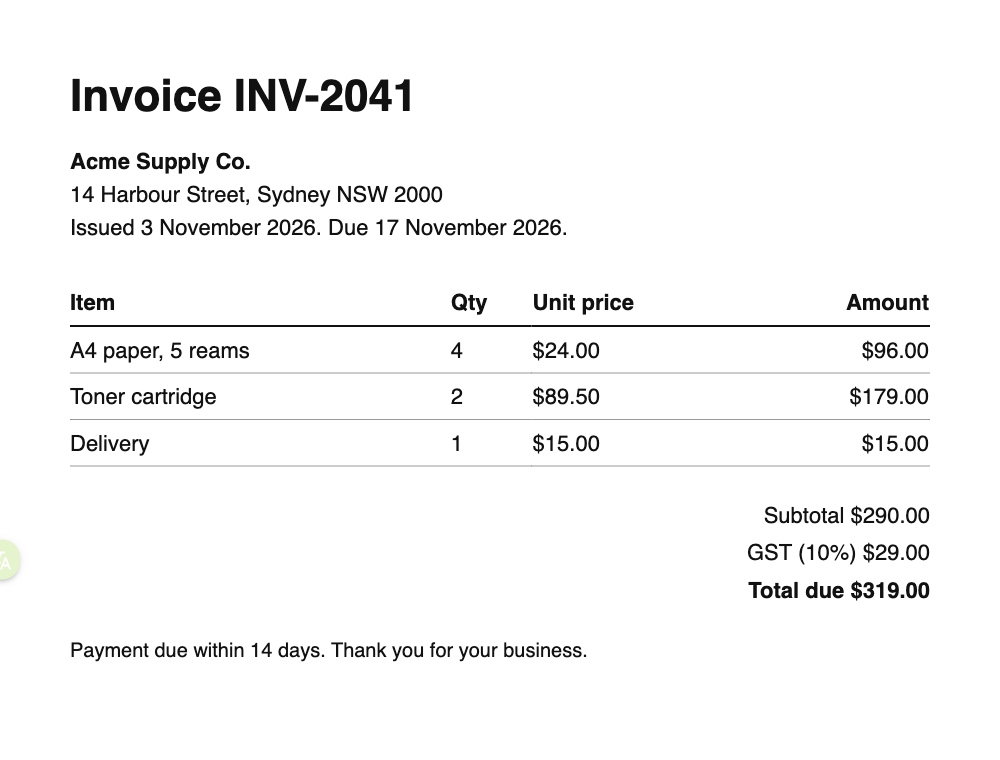
A one-page invoice: a heading, the supplier address, a four-column table with three line items, and totals. It is a clean, printed layout, so every model read the words. The difference is the table: some models return it as a Markdown table you can parse, others return the cells as loose lines.
Download the file and run it yourself:
curl https://api.ocrrouter.ai/v1/ocr \
  -H "Authorization: Bearer $OCRROUTER_API_KEY" \
  -H "Content-Type: application/json" \
  -d '{
    "model": "mistral/mistral-ocr",
    "file_url": "https://ocrrouter.ai/sample-invoice.png",
    "format": "markdown"
  }'
Speed and success, last 7 days
From real requests on OCRRouter, not from the single test above.
Loading the last 7 days…
Cite this benchmark
OCRRouter OCR benchmark, 2026-11-14. https://ocrrouter.ai/benchmark